
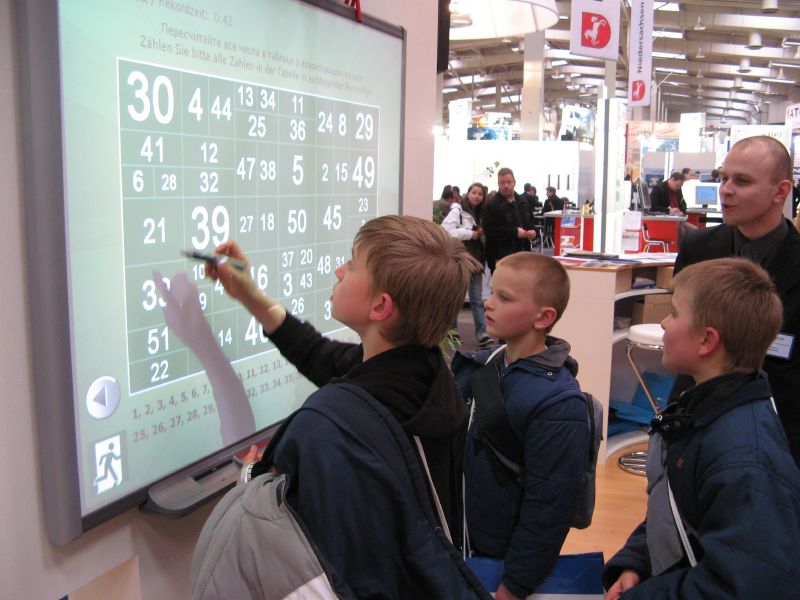
The interactive whiteboard has gained popularity with teachers when used simultaneously with a computer and video
projector as it creates an interactive learning community. Instead of having to crowd
around one or two computers, the interactive whiteboard can not only display material on a
screen, but also respond to human interaction, responding to both computer commands,
and touch commands on the screen. Being touch-sensitive, means students can control the
board and manipulate applications with their finger or pens. Students can annotate notes
on the screen or compose original material that can be saved, printed or disseminated
electronically.
The whiteboard was originally marketed to teachers as a high-tech version of a chalkboard
or flip chart that eliminated the need for chalk or markers (Lee, 1992). The ability to write
and save notes, as well as the growing popularity of its use in distance learning and
communication, sparked interest in the interactive board. As the product became more
popular and therefore less expensive, universities and school districts began experimenting
with the use of the interactive board as a teaching device.
Interactive Technology can help professors enhance communication in the classroom so there is increased attention, interest, preparation, and retention of class materials by the students. Interactive Technology (also called audience response systems) involves students using individual response pads (clickers) to respond to questions asked in class by the professor. The students’ responses are captured by a receiver and with the software available, professors can get instant feedback from their students to determine how well they understand the material presented. To get started using this technology, professors can either buy a system outright or utilize one in conjunction with their textbook. After attending a few training classes and working with their Information Technology people to install it in their classroom, a professor can start working with the system to enhance their interaction with students in class.
Sources:
http://www.btinternet.com/~tony.poulter/IWBs/info.htm
www.editlib.org/index.cfm?fuseaction=Reader.ViewAbstract&paper_id=28842
http://partners.becta.org.uk/page_documents/research/wtrs_whiteboards.pdf
projector as it creates an interactive learning community. Instead of having to crowd
around one or two computers, the interactive whiteboard can not only display material on a
screen, but also respond to human interaction, responding to both computer commands,
and touch commands on the screen. Being touch-sensitive, means students can control the
board and manipulate applications with their finger or pens. Students can annotate notes
on the screen or compose original material that can be saved, printed or disseminated
electronically.
The whiteboard was originally marketed to teachers as a high-tech version of a chalkboard
or flip chart that eliminated the need for chalk or markers (Lee, 1992). The ability to write
and save notes, as well as the growing popularity of its use in distance learning and
communication, sparked interest in the interactive board. As the product became more
popular and therefore less expensive, universities and school districts began experimenting
with the use of the interactive board as a teaching device.
Interactive Technology can help professors enhance communication in the classroom so there is increased attention, interest, preparation, and retention of class materials by the students. Interactive Technology (also called audience response systems) involves students using individual response pads (clickers) to respond to questions asked in class by the professor. The students’ responses are captured by a receiver and with the software available, professors can get instant feedback from their students to determine how well they understand the material presented. To get started using this technology, professors can either buy a system outright or utilize one in conjunction with their textbook. After attending a few training classes and working with their Information Technology people to install it in their classroom, a professor can start working with the system to enhance their interaction with students in class.
Sources:
http://www.btinternet.com/~tony.poulter/IWBs/info.htm
www.editlib.org/index.cfm?fuseaction=Reader.ViewAbstract&paper_id=28842
http://partners.becta.org.uk/page_documents/research/wtrs_whiteboards.pdf

No comments:
Post a Comment